Ubuntu系统
要想学习ROS,要先安装Ubuntu系统,下面是Ubantu系统(Linux系统)的一些基本命令
# =============================================================================
# Linux 基础命令参考手册
# =============================================================================

# 1. 目录操作命令
# =============================================================================

# pwd = Print Work Directory (显示当前工作目录)
pwd

# cd = Change Directory (切换目录)
cd /path/to/directory    # 切换到指定目录
cd ..                    # 返回上一级目录
cd ~                     # 返回 home 目录
cd -                     # 返回上一次访问的目录

# ls = list (列出目录内容)
ls          # 列出当前目录内容
ls -a       # 显示所有文件(包括隐藏文件)
ls -l       # 详细列表显示(权限、大小、时间)
ls -la      # 显示所有文件的详细信息

# mkdir = make directory (创建目录)
mkdir dirname            # 创建目录
mkdir -p parent/child    # 创建多级目录

# 2. 文件操作命令
# =============================================================================

# rm = remove (删除文件或目录)
rm filename              # 删除文件
rm -r dirname            # 删除文件夹(递归删除)
rm -rf dirname           # 强制删除(不询问)

# mv = move (移动或重命名文件)
mv filename folder/filename    # 移动文件
mv oldname newname             # 重命名文件

# cp = copy (复制文件或目录)
cp file1 file2           # 复制文件
cp -r dir1 dir2          # 复制目录

# 3. 文件查看命令
# =============================================================================

# cat = catenate (连续输出文件内容)
cat filename             # 显示整个文件内容

# less = "比 more 更强" (分页查看文件)
less filename            # 分页查看文件内容

# tail = 取文件"尾巴" (查看文件末尾内容)
tail filename            # 查看文件末尾10行
tail -f filename         # 实时跟踪文件变化
tail -n 20 filename      # 查看文件末尾20行

# 4. 文本编辑器
# =============================================================================

# vi = visual interface (命令行文本编辑器)
# vim = vi improved (改进版 vi)
# gedit = GNOME 的图形化文本编辑器

# 编辑器使用示例:
gedit hello.cpp          # 打开图形化编辑器(推荐新手用)
vim hello.cpp            # 打开命令行编辑器
vi hello.cpp             # 打开 vi 编辑器

# =============================================================================
# 使用说明:
# 1. 在终端中直接输入命令即可执行
# 2. 注意命令和参数之间的空格
# 3. 谨慎使用 rm -rf 命令
# =============================================================================
ROS基础概念
ROS重要概念介绍
ROS基础工作空间(Workspace):存放工程开发相关文件的文件夹。类似一个IDE(例如Pycharm)新建一个工程,就是一个工作空间。包含4个文件夹:
src:代码空间(Source Space):放置功能包代码
build:编译空间(Build Space):编译过程中产生的中间文件,不用过多关注
devel:开发空间(Development Space):放置编译生成的可执行文件、库、脚本
install:安装空间(Install Space):存放可执行文件,与上面devel有一定重复
————————————————
先创建一个工作空间;
再创建一个功能包;catkin_create_pkg 包名 依赖包
编辑源文件;
编辑配置文件;
编译并执行。
mkdir -p ~/catkin_ws/src
cd ~/catkin_ws
catkin_make
source devel/setup.bash
cd src
catkin_create_pkg robot_control roscpp std_msgs geometry_msgs
ROS代码编写
#include "ros/ros.h"   //写入ROS头文件
#include "geometry_msgs/Twist.h"  //写入速度消息处理头文件
//linear.x / linear.y / linear.z(线速度)
angular.x / angular.y / angular.z(角速度)

//arguement count/arguement vector 用于传参
int main(int argc,char** argv){

  ros::init(argc,argv,"move_robot_node");  //通过初始化一个节点,相当于在ROS Master系统中注册了一个节点用于通信和管理进程

  ros:Nodehandle nh; //定义一个节点句柄用于创建发布者和订阅者
  ros::Publisher pub=nh.advertise<geometry_msgs::Twist>("cmd_vel",10); //用Publisher创建了一个叫pub的发布者,发布的消息类型为Twist,发布到的话题名称为cmd_vel,队列长度为10

}
rate函数和sleep函数
ros::Rate define_rate_name(20) //会定义一个“节拍器”,以一秒二十次的频率工作
为了保证系统在运行过程中的稳定性,通常会使用sleep函数这个函数是为了保证ROS系统按照某一特定频率运行
特殊地,对于一个循环而言,例如:
for(int i=0;i<30;++i){
  some command;
  rate.sleep();
}
由于循环执行了三十次,我们又知道“节拍器”一秒钟运行三十次,也就相当于在这里我们执行了三秒,通过“节拍器”这一“睡眠特性”我们能够让整个ROS中所出现的代码以我们预想的秒数执行,达到稳定的状态。
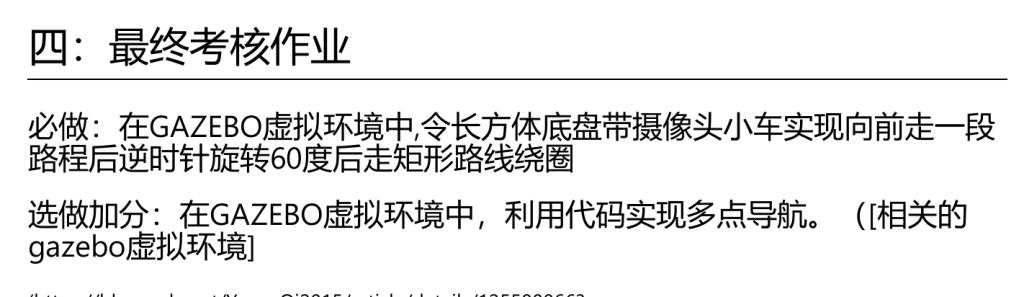
根据sleep的这一特性,结合最终考核任务让小车前进一段距离后逆时针旋转60°后做矩形运动,我们可以编写一个前进函数和一个旋转函数,通过旋转函数来进行60°的逆时针运动和做矩形运动。具体示例:
void move_forward(double second){
    geometry_msgs::Twist t1;
    ros::Rate rate(10); //一秒十次,相当于0.1秒每次
    int n=second/0.1;
    t1.linear.x=1.0;
    for(int i=0;i<n;i++){
        pub.publish(t1);
        rate.sleep();
    }
    ROS_INFO("前进中")
}
但是在实际编译的过程中,会弹出编译错误的提示,这是因为我们没有对函数中pub定义造成的。因此正确的写法是:
void move_forward(ros::Publisher pub,double second){
    geometry_msgs::Twist t1;
    ros::Rate rate(10); //一秒十次,相当于0.1秒每次
    int n=second/0.1;
    t1.linear.x=1.0;
    for(int i=0;i<n;i++){
        pub.publish(t1);
        rate.sleep();
    }
    ROS_INFO("前进中")
}
前进函数的问题我们解决了,接下来我们开始思考如何处理旋转函数呢?任务中我们得知,要使小车旋转60度。
然而,在geometry包的Twist头文件中,只给了角速度的定义,似乎没有角度的定义,这就需要我们使用那个角度和弧度互换的公式,但是由此必定产生误差,这怎么办呢?在翻阅资料的过程中我得知,在cmath头文件中有一个数值M_PI定义了圆周率,那么由前进函数的定义,可以得到旋转函数的定义:
void turn_function(ros::Publisher pub_name,double angle){
    geometry_msgs::Twist t1;
    ros::Rate rate(10);
    t1.angular.z=0.1; //弧度制即0.1rad/s
    double angle_rad=angle*M_PI/180.0; //M_PI=3.1415926.... 这一步目的是将角度转化为弧度
    int n=angle_rad/0.1;
    for(int i=0;i<n;i++){
        pub_name.publish(t1);
        rate.sleep();
        ROS_INFO("旋转中");
    }
    t1.angular.z=0;
    pub_name.publish(t1);
    ROS_INFO("旋转完成")
}
上述代码完成之后,实际运行中却出现了在输出停止信号后机器人仍然在旋转,查阅CSDN及其他资料后发现,可能是停止指令未被接收到的原因,因此我们可以通过多次发送停止指令,来达到我们的目的。
void move_forward(ros::Publisher pub_name,double second){
    geometry_msgs::Twist t1;
    ros::Rate rate(10); //一秒十次,相当于0.1秒每次
    int n=second/0.1;
    t1.linear.x=0.1;
    for(int i=0;i<n;i++){
        pub_name.publish(t1);
        rate.sleep();
        ROS_INFO("前进中");
    }
//用pub_name作参数名的原因是和pub区分,实际查阅过程中发现可以用指针来代替,避免直接传参。
    for(int i=0;i<3;i++){
    t1.linear.x=0.0;
    pub_name.publish(t1);
    ROS_INFO("前进完成");}
}

void turn_function(ros::Publisher pub_name,double angle){
    geometry_msgs::Twist t1;
    ros::Rate rate(10);  //依然0.1秒每次
    t1.angular.z=0.1; //弧度制即0.1rad/s
    double angle_rad=angle*M_PI/180.0; //M_PI=3.1415926.... 这一步目的是将角度转化为弧度
    int n=angle_rad/0.01; //相当于rad / rad/s =s  然后再通过频率计算次数
    for(int i=0;i<n;i++){
        pub_name.publish(t1);
        rate.sleep();
        ROS_INFO("旋转中");
    }
    for(int i=0;i<3;i++){
    t1.angular.z=0;
    pub_name.publish(t1);
    ROS_INFO("旋转完成");}
}
在一次前进和一次旋转中,这段代码很出色地完成了任务,偏转角yaw=1.047近似等于60°,但在接下来做矩形的操作中,代码存在一些问题,于是又进行了一些改进:
#include "ros/ros.h"
#include "geometry_msgs/Twist.h"
#include <cmath>

void move_forward(ros::Publisher pub_name,double second){
    geometry_msgs::Twist t1;
    ros::Rate rate(10); //一秒十次,相当于0.1秒每次
    int n=second/0.1;
    t1.linear.x=0.1;
    for(int i=0;i<n;i++){
        pub_name.publish(t1);
        rate.sleep();
        ROS_INFO("前进中");
    }

    t1.linear.x=0.0;
    pub_name.publish(t1);
    ros::Duration(0.2).sleep();
    ROS_INFO("前进完成");
}

void turn_function(ros::Publisher pub_name,double angle){
    geometry_msgs::Twist t1;
    ros::Rate rate(10);  //依然0.1秒每次
    t1.angular.z=0.1; //弧度制即0.1rad/s
    double angle_rad=angle*M_PI/180.0; //M_PI=3.1415926.... 这一步目的是将角度转化为弧度
    int n=angle_rad/0.01; //相当于rad / rad/s =s  然后再通过频率计算次数
    for(int i=0;i<n;i++){
        pub_name.publish(t1);
        rate.sleep();
        ROS_INFO("旋转中");
    }

    t1.angular.z=0;
    pub_name.publish(t1);
      ros::Duration(0.2).sleep();
    ROS_INFO("旋转完成");
}

int main(int argc,char** argv){
    setlocale(LC_ALL, "");
    ros::init(argc,argv,"Robot_Control");
    ros::NodeHandle nh;
    ros::Publisher pub = nh.advertise<geometry_msgs::Twist>("/cmd_vel",10);

    move_forward(pub,10);
    turn_function(pub,60);
    move_forward(pub,10);
    turn_function(pub,90);
    move_forward(pub,6);
    turn_function(pub,90);
    move_forward(pub,10);
    turn_function(pub,90);
    move_forward(pub,6);
    return 0;
}
在实际运行中,很快就发现小车的运行与预期存在差距,继续学习后发现这种方式造成的偏差巨大,于是有了更加精确的代码:
#include "ros/ros.h"
#include "nav_msgs/Odometry.h"
#include "tf/transform_datatypes.h"
#include <cmath>

void callback(const nav_msgs::Odometry::ConstPtr& msg){

    tf::Quaternion test(
        msg -> pose.pose.orientation.x,
        msg -> pose.pose.orientation.y,
        msg -> pose.pose.orientation.z,
        msg -> pose.pose.orientation.w
    );

    tf::Matrix3x3 m(test);
    double roll,pitch,yaw;
    m.getRPY(roll,pitch,yaw);
    ROS_INFO("当前机器人偏转弧度角:%.2f,偏转角度%.2f; 位置坐标:x:%.2f,y:%2.f,z:%.2f",yaw,yaw*180/M_PI,msg->pose.pose.position.x,msg->pose.pose.position.y,msg->pose.pose.position.z );
}

int main(int argc,char** argv){
    setlocale(LC_ALL,"");
    ros::init(argc,argv,"postion_robot");
    ros::NodeHandle nh;
    ros::Subscriber sub = nh.subscribe("odom",10,callback);
    ros::spin();

    return 0;
}
使用这段代码能够很好的获取机器人的偏转角,这是利用了tf坐标工具中四元数转偏转角的方法,通过这种实时获取偏转角的方法我们可以即时获得机器人的偏转角,以此达到更加稳定的控制,因此我们有了以下的代码:
#include "ros/ros.h"
#include "geometry_msgs/Twist.h"
#include "tf/tf.h"
#include "nav_msgs/Odometry.h"
#include <cmath>

double yaw=0;
void callback(const nav_msgs::Odometry::ConstPtr& msg){

    tf::Quaternion test(
        msg -> pose.pose.orientation.x,
        msg -> pose.pose.orientation.y,
        msg -> pose.pose.orientation.z,
        msg -> pose.pose.orientation.w
    );

    tf::Matrix3x3 m(test);
    double roll,pitch;
    m.getRPY(roll,pitch,yaw);
}

void move_forward(ros::Publisher pub_name,double second){
    geometry_msgs::Twist t1;
    ros::Rate rate(10); //一秒十次,相当于0.1秒每次
    int n=second/0.1;
    t1.linear.x=0.1;
    for(int i=0;i<n;i++){
        pub_name.publish(t1);
        rate.sleep();
        ROS_INFO("前进中");
    }

    t1.linear.x=0.0;
    pub_name.publish(t1);
    ros::Duration(0.2).sleep();
    ROS_INFO("前进完成");
}

void turn_function(ros::Publisher pub_name,double target_angle){
    geometry_msgs::Twist t1;
    ros::Rate rate(10);  //依然0.1秒每次
    t1.angular.z=0.3; //弧度制即0.3rad/s
    double start_rad=yaw; //只会赋值一次
    double target_rad=target_angle*M_PI/180.0;

    while(ros::ok()){
        double delta = yaw - start_rad;
        if (delta > M_PI) delta -= 2 * M_PI;
        if (delta < -M_PI) delta += 2 * M_PI;//这里是为了旋转最短方案,也是为了偏转角不越界
        if(fabs(delta) >= target_rad){
            break;
        }
        else {pub_name.publish(t1);
            ros::spinOnce();
            rate.sleep();
        }

    }

    t1.angular.z=0;
    pub_name.publish(t1);
    ros::Duration(0.2).sleep();
    ROS_INFO("旋转完成");
}

int main(int argc,char** argv){
    setlocale(LC_ALL, "");
    ros::init(argc,argv,"Robot_Control");
    ros::NodeHandle nh;
    ros::Publisher pub = nh.advertise<geometry_msgs::Twist>("/cmd_vel",10);
    ros::Subscriber sub = nh.subscribe("/odom", 10, callback);

    move_forward(pub,10);
    turn_function(pub,60);
    move_forward(pub,10);
    turn_function(pub,90);//
    move_forward(pub,6);
    turn_function(pub,90);
    move_forward(pub,10);
    turn_function(pub,90);
    move_forward(pub,6);
    return 0;
}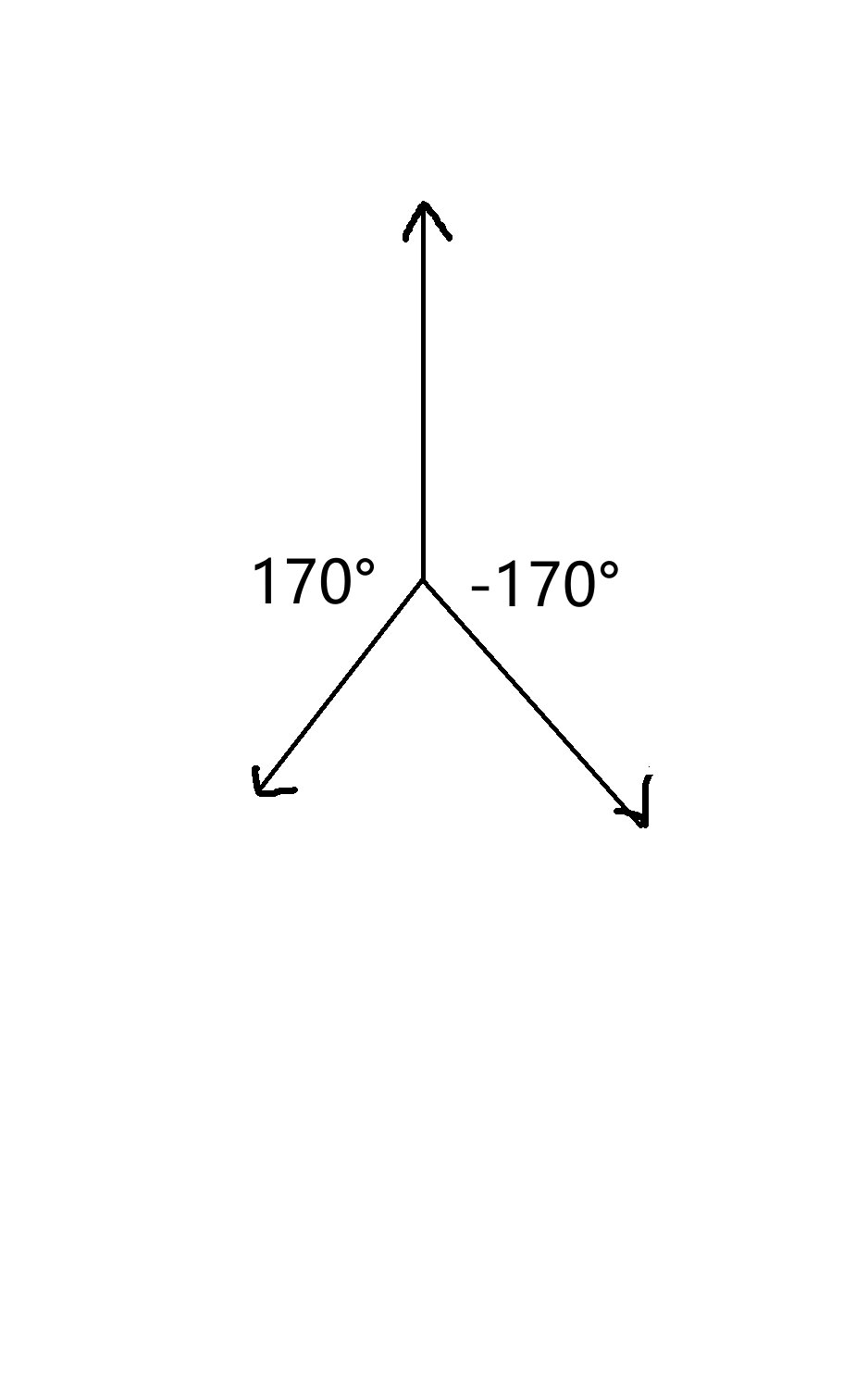
实际运行时发现,转第三个角度时,运行与预期存在差距:
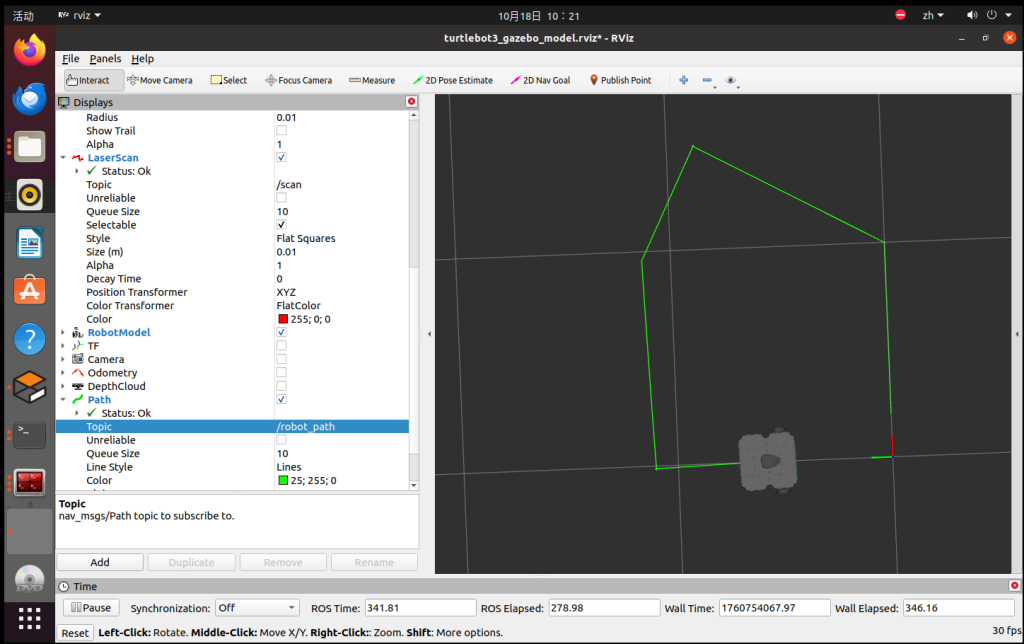
观察后发现,这可能是由于小车速度过快导致命令接收不到导致的,于是在旋转函数开头中加入等待周期,以使其准确获得信息,如此,得到以下最终代码:
#include "ros/ros.h"
#include "geometry_msgs/Twist.h"
#include "tf/tf.h"
#include "nav_msgs/Odometry.h"
#include <cmath>

double yaw=0;
void callback(const nav_msgs::Odometry::ConstPtr& msg){

    tf::Quaternion test(
        msg -> pose.pose.orientation.x,
        msg -> pose.pose.orientation.y,
        msg -> pose.pose.orientation.z,
        msg -> pose.pose.orientation.w
    );

    tf::Matrix3x3 m(test);
    double roll,pitch;
    m.getRPY(roll,pitch,yaw);
}

void move_forward(ros::Publisher pub_name,double second){
    geometry_msgs::Twist t1;
    ros::Rate rate(10); //一秒十次,相当于0.1秒每次
    int n=second/0.1;
    t1.linear.x=0.1;
    for(int i=0;i<n;i++){
        pub_name.publish(t1);
        rate.sleep();
        ROS_INFO("前进中");
    }

    t1.linear.x=0.0;
    pub_name.publish(t1);
    ros::Duration(0.2).sleep();
    ROS_INFO("前进完成");
}

void turn_function(ros::Publisher pub_name,double target_angle){
    geometry_msgs::Twist t1;
    ros::Rate rate(10);  //依然0.1秒每次
    t1.angular.z=0.3; //弧度制即0.3rad/s
    ros::spinOnce();
    ros::Duration(0.1).sleep();
    double start_rad=yaw; //只会赋值一次
    double target_rad=target_angle*M_PI/180.0;

    while(ros::ok()){
        double delta = yaw - start_rad;
        if (delta > M_PI) delta -= 2 * M_PI;
        if (delta < -M_PI) delta += 2 * M_PI;
        if(fabs(delta) >= target_rad){
            break;
        }
        else {pub_name.publish(t1);
            ros::spinOnce();
            rate.sleep();
        }

    }

    t1.angular.z=0;
    pub_name.publish(t1);
    ros::Duration(0.2).sleep();
    ROS_INFO("旋转完成");
}

int main(int argc,char** argv){
    setlocale(LC_ALL, "");
    ros::init(argc,argv,"Robot_Control");
    ros::NodeHandle nh;
    ros::Publisher pub = nh.advertise<geometry_msgs::Twist>("/cmd_vel",10);
    ros::Subscriber sub = nh.subscribe("/odom", 10, callback);

    move_forward(pub,10);
    turn_function(pub,60);
    move_forward(pub,10);
    turn_function(pub,90);
    move_forward(pub,6);
    turn_function(pub,90);
    move_forward(pub,10);
    turn_function(pub,90);
    move_forward(pub,6);
    return 0;
}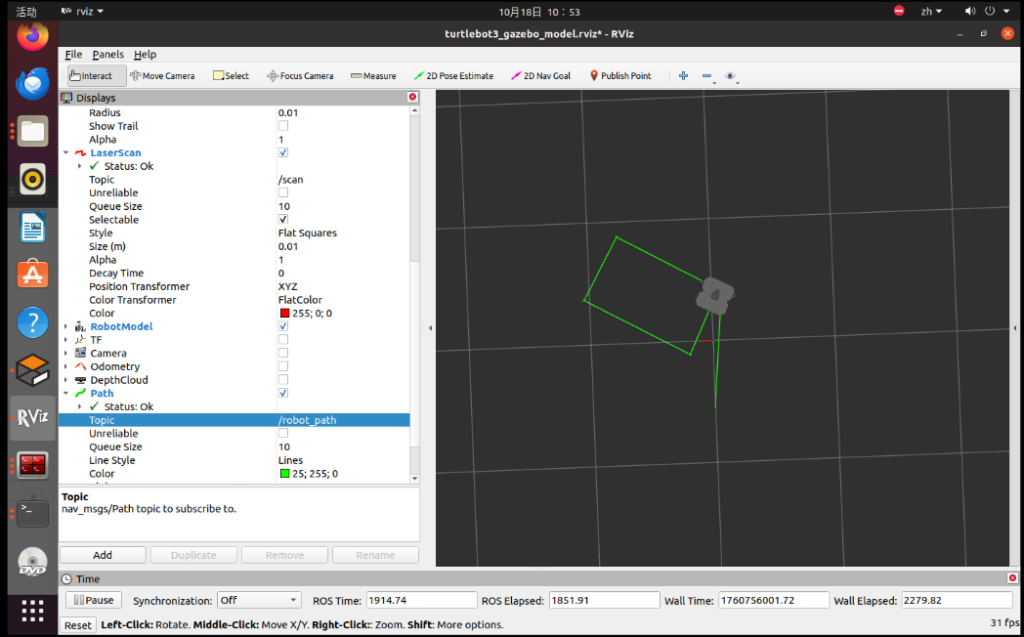
在提交作业录制视频的过程中,几次测试发现小车不一定能走出完美矩形,说明代码存在问题,由于加分项目部分引入了move_base服务器,move_base能够发布详细旋转(四元数)于是决定用该方法继续完善代码,于是得到最终代码:
#include "ros/ros.h"
#include "geometry_msgs/Twist.h"
#include "tf/tf.h"
#include "nav_msgs/Odometry.h"
#include <cmath>
#include <move_base_msgs/MoveBaseAction.h>
#include <actionlib/client/simple_action_client.h>


double yaw=0,current_x=0,current_y=0;
typedef actionlib::SimpleActionClient<move_base_msgs::MoveBaseAction> MoveBaseClient;
void callback(const nav_msgs::Odometry::ConstPtr& msg){
    current_x = msg->pose.pose.position.x;
    current_y = msg->pose.pose.position.y;
    tf::Quaternion q(
        msg -> pose.pose.orientation.x,
        msg -> pose.pose.orientation.y,
        msg -> pose.pose.orientation.z,
        msg -> pose.pose.orientation.w
    );

    tf::Matrix3x3 m(q);
    double roll,pitch;
    m.getRPY(roll,pitch,yaw);
}

void move_forward(ros::Publisher pub_name,double second){
    geometry_msgs::Twist t1;
    ros::Rate rate(10); //一秒十次,相当于0.1秒每次
    int n=second/0.1;
    t1.linear.x=0.1;
    for(int i=0;i<n;i++){
        pub_name.publish(t1);
        rate.sleep();
        ROS_INFO("前进中");
    }

    t1.linear.x=0.0;
    pub_name.publish(t1);
    ros::Duration(0.2).sleep();
    ROS_INFO("前进完成");
}

void turn_function(MoveBaseClient& client,double target_angle){
    ros::Duration(2).sleep();
    ros::spinOnce();
    double target_yaw =yaw+(target_angle*M_PI/180.0);
    while(target_yaw> M_PI) target_yaw -= 2*M_PI;
    while(target_yaw<-M_PI) target_yaw += 2*M_PI;


    move_base_msgs::MoveBaseGoal goal;
    goal.target_pose.header.frame_id = "map";
    goal.target_pose.header.stamp = ros::Time::now();

    goal.target_pose.pose.position.x= current_x;
    goal.target_pose.pose.position.y= current_y;
    goal.target_pose.pose.position.z= 0;
    goal.target_pose.pose.orientation = tf::createQuaternionMsgFromYaw(target_yaw);
    client.sendGoal(goal);
    ros::spinOnce();
    ros::Duration(2.0).sleep();
    ROS_INFO("旋转完成");
    yaw = target_yaw;
}

int main(int argc,char** argv){
    setlocale(LC_ALL, "");
    ros::init(argc,argv,"Robot_Control");
    ros::NodeHandle nh;
    ros::Publisher pub = nh.advertise<geometry_msgs::Twist>("/cmd_vel",10);
    ros::Subscriber sub = nh.subscribe("/odom", 10, callback);

    ros::Duration(1.0).sleep();
    ros::spinOnce();

    MoveBaseClient client("move_base",true);
    client.waitForServer(ros::Duration(5.0));

    move_forward(pub,10);
    turn_function(client,60);
    move_forward(pub,10);
    turn_function(client,90);
    move_forward(pub,6);
    turn_function(client,90);
    move_forward(pub,10);
    turn_function(client,90);
    move_forward(pub,6);
    return 0;
}
真的是这样吗?然而,在实际运动中出现了以下问题:
当我测试了一天一夜之后,终于发现了错误,速度太快了,小车反应不过来!等待时间要久一点,于是我终于终于完成了最终代码:
#include "ros/ros.h"
#include "geometry_msgs/Twist.h"
#include "tf/tf.h"
#include "nav_msgs/Odometry.h"
#include <cmath>

double yaw=0;
void callback(const nav_msgs::Odometry::ConstPtr& msg){

    tf::Quaternion test(
        msg -> pose.pose.orientation.x,
        msg -> pose.pose.orientation.y,
        msg -> pose.pose.orientation.z,
        msg -> pose.pose.orientation.w
    );

    tf::Matrix3x3 m(test);
    double roll,pitch;
    m.getRPY(roll,pitch,yaw);
}

void move_forward(ros::Publisher pub_name,double second){
    geometry_msgs::Twist t1;
    ros::Rate rate(10); //一秒十次,相当于0.1秒每次
    int n=second/0.1;
    t1.linear.x=0.1;
    for(int i=0;i<n;i++){
        pub_name.publish(t1);
        rate.sleep();
        ROS_INFO("前进中");
    }

    t1.linear.x=0.0;
    pub_name.publish(t1);
    ros::Duration(0.2).sleep();
    ROS_INFO("前进完成");
}

void turn_function(ros::Publisher pub_name,double target_angle){
    geometry_msgs::Twist t1;
    ros::Rate rate(10);  //依然0.1秒每次
    t1.angular.z=0.3; //弧度制即0.3rad/s
    ros::spinOnce();
    ros::Duration(0.1).sleep();
    double start_rad=yaw; //只会赋值一次
    double target_rad=target_angle*M_PI/180.0;

    while(ros::ok()){
        double delta = yaw - start_rad;
        if (delta > M_PI) delta -= 2 * M_PI;
        if (delta < -M_PI) delta += 2 * M_PI;
        if(fabs(delta) >= target_rad){
            break;
        }
        else {pub_name.publish(t1);
            ros::spinOnce();
            rate.sleep();
        }

    }

    t1.angular.z=0;
    pub_name.publish(t1);
    ros::Duration(0.2).sleep();
    ROS_INFO("旋转完成");
}

int main(int argc,char** argv){
    setlocale(LC_ALL, "");
    ros::init(argc,argv,"Robot_Control");
    ros::NodeHandle nh;
    ros::Publisher pub = nh.advertise<geometry_msgs::Twist>("/cmd_vel",10);
    ros::Subscriber sub = nh.subscribe("/odom", 10, callback);

    move_forward(pub,10);
    turn_function(pub,60);
    move_forward(pub,10);
    turn_function(pub,90);
    move_forward(pub,6);
    turn_function(pub,90);
    move_forward(pub,10);
    turn_function(pub,90);
    move_forward(pub,6);
    return 0;
}
可惜事情的发展并没有想象中的顺利,在我想要提交作业录制视频的过程中,发现几次测试小车行走路线都不一致,于是经过几天的对代码的精进和调试,终于得到以下代码:
#include "ros/ros.h"
#include "geometry_msgs/Twist.h"
#include "tf/tf.h"
#include "nav_msgs/Odometry.h"
#include <cmath>
#include <move_base_msgs/MoveBaseAction.h>
#include <actionlib/client/simple_action_client.h>

double yaw=0,current_x=0,current_y=0;
typedef actionlib::SimpleActionClient<move_base_msgs::MoveBaseAction> MoveBaseClient;

void callback(const nav_msgs::Odometry::ConstPtr& msg){
    current_x = msg->pose.pose.position.x;
    current_y = msg->pose.pose.position.y;
    tf::Quaternion q(
        msg -> pose.pose.orientation.x,
        msg -> pose.pose.orientation.y,
        msg -> pose.pose.orientation.z,
        msg -> pose.pose.orientation.w
    );

    tf::Matrix3x3 m(q);
    double roll,pitch;
    m.getRPY(roll,pitch,yaw);
}


void move_forward(ros::Publisher pub_name,double second){
    geometry_msgs::Twist t1;
    ros::Rate rate(10);
    int n=second/0.1;
    t1.linear.x=0.1;
    t1.angular.z=0.0;
    for(int i=0;i<n;i++){
        pub_name.publish(t1);
        rate.sleep();
        ROS_INFO("前进中");
        ros::spinOnce();
    }

    t1.linear.x=0.0;
    pub_name.publish(t1);
    ROS_INFO("前进完毕");
    ros::Duration(0.5).sleep();
}

void turn_function(ros::Publisher& pub_name,double target_angle){
    ros::spinOnce();
    ros::Rate rate(50);
    double start_yaw = yaw;
    double target_yaw = start_yaw + target_angle * M_PI/180.0;
    while(target_yaw > M_PI) target_yaw -= 2*M_PI;
    while(target_yaw < -M_PI) target_yaw += 2*M_PI;

    geometry_msgs::Twist twist;
    double angular_speed = 0.3;
    double delta = target_yaw - yaw;

    while(ros::ok() && fabs(delta) > 0.02){
        ros::spinOnce();
        delta = target_yaw - yaw;
        if (delta > M_PI) delta -= 2*M_PI;
        if (delta < -M_PI) delta += 2*M_PI;

        twist.linear.x = 0.0;
        twist.angular.z = (delta > 0) ? angular_speed : -angular_speed;
        pub_name.publish(twist);
        rate.sleep();
    }

    twist.angular.z = 0.0;
    pub_name.publish(twist);
    ROS_INFO("旋转完成");
    ros::Duration(0.5).sleep();
}

int main(int argc,char** argv){
    setlocale(LC_ALL, "");
    ros::init(argc,argv,"Robot_Control");
    ros::NodeHandle nh;
    ros::Publisher pub = nh.advertise<geometry_msgs::Twist>("/cmd_vel",10);
    ros::Subscriber sub = nh.subscribe("/odom", 10, callback);
    ros::Duration(2.0).sleep();
    ros::spinOnce();

    move_forward(pub,10);
    turn_function(pub,60);
    move_forward(pub,10);
    turn_function(pub,90);
    move_forward(pub,6);
    turn_function(pub,90);
    move_forward(pub,10);
    turn_function(pub,90);
    move_forward(pub,6);

    return 0;
}
环境变量问题
roslaunch turtlebot3_gazebo turtlebot3_world.launch
echo “export TURTLEBOT3_MODEL=burger” >> ~/.bashrc
source ~/.bashrc
burger(最小型)
waffle(带摄像头、激光雷达)
waffle_pi(带树莓派摄像头)
roslaunch turtlebot3_gazebo turtlebot3_gazebo_rviz.launch
1.rosrun robot_control move_robot
2.rosrun robot_control path
3.roslaunch turtlebot3_gazebo turtlebot3_empty_world.launch
4.roslaunch turtlebot3_gazebo turtlebot3_gazebo_rviz.launch map=odom
进阶任务
#include <ros/ros.h>
#include <move_base_msgs/MoveBaseAction.h>
#include <actionlib/client/simple_action_client.h>
#include <tf/tf.h>
#include <cmath>

int main(int argc,char** argv){
    ros::init(argc,argv,"nav_goal");
    actionlib::SimpleActionClient<move_base_msgs::MoveBaseAction> MoveBaseClient;  //定义一个叫MoveBaseClient的新类型

    MoveBaseClient client("move_base",true); //用这个新类型创建一个叫client的变量,move_base是动作服务器名称,true是自动处理消息
    ROS_INFO("等待启动成功");
    client.waitForServer(ros::Duration(5.0));
    ROS_INFO("连接成功!");

    move_base_msgs::MoveBaseGoal goal;

    goal.target_pose.header.frame_id = "map";  // 使用全局地图
    goal.target_pose.header.stamp = ros::Time::now();    //时间戳获取当前时间

    goal.target_pose.pose.position.x= 3.0;
    goal.target_pose.pose.position.y= 2.0;

    double yaw=M_PI;
    tf::Quaternion q = tf::createQuaternionFromYaw(yaw);
    goal.target_pose.pose.orientation.x = q.x();
    goal.target_pose.pose.orientation.y = q.y();
    goal.target_pose.pose.orientation.z = q.z();
    goal.target_pose.pose.orientation.w = q.w();
    /*这里和旋转部分反过来,偏转角转化为四元数是因为在旋转中偏转角更直观,
    而实际上四元数能避免万向锁等问题,系统误差更小。*/
    /*
    goal (MoveBaseGoal)
    └── target_pose (PoseStamped)
    ├── header (Header)
    │   ├── seq
    │   ├── stamp
    │   └── frame_id
    └── pose (Pose)
        ├── position (Point)
        │   ├── x  ← 我们设置的X坐标
        │   ├── y  ← Y坐标
        │   └── z  ← Z坐标
        └── orientation (Quaternion)
            ├── x
            ├── y
            ├── z
            └── w
    */


    ROS_INFO("发送导航目标...");
    client.sendGoal(goal);

    client.waitForResult();//等一下结果,避免没收到

    if(client.getState() == actionlib::SimpleClientGoalState::SUCCEEDED)
        ROS_INFO("到达目标点!");
    else
        ROS_WARN("未能到达目标点!");

    return 0;
}
通过这样我们可以让机器人移动到指定的点x=3.0,y=2.0。于是我们创建一个数组就能满足多点导航:
#include <ros/ros.h>
#include <move_base_msgs/MoveBaseAction.h>
#include <actionlib/client/simple_action_client.h>
#include <tf/tf.h>
#include <cmath>

int main(int argc,char** argv){
    setlocale(LC_ALL, "");
    ros::init(argc,argv,"nav_goal");
    typedef actionlib::SimpleActionClient<move_base_msgs::MoveBaseAction> MoveBaseClient;  //定义一个叫MoveBaseClient的新类型

    MoveBaseClient client("move_base",true); //用这个新类型创建一个叫client的变量,move_base是动作服务器名称,true是自动处理消息
    ROS_INFO("等待启动成功");
    client.waitForServer(ros::Duration(5.0));
    ROS_INFO("连接成功!");

    double goals[][3]={
        {-1.5,0.5,0},
        {2.05,0.3,0},
        {3,2,M_PI},
        {1.06,2.48,0},
        {-6.04,5.04,0},
        {-6.5,-3.42,0},
    };

    for(int i=0;i<6;++i){
    move_base_msgs::MoveBaseGoal goal;
    goal.target_pose.header.frame_id = "map";  // 使用全局地图
    goal.target_pose.header.stamp = ros::Time::now();    //时间戳获取当前时间

    goal.target_pose.pose.position.x=goals[i][0] ;
    goal.target_pose.pose.position.y=goals[i][1] ;

    double yaw=goals[i][2];
    tf::Quaternion q = tf::createQuaternionFromYaw(yaw);
    goal.target_pose.pose.orientation.x = q.x();
    goal.target_pose.pose.orientation.y = q.y();
    goal.target_pose.pose.orientation.z = q.z();
    goal.target_pose.pose.orientation.w = q.w();
    /*这里和旋转部分反过来,偏转角转化为四元数是因为在旋转中偏转角更直观,
    而实际上四元数能避免万向锁等问题,系统误差更小。*/
    /*
    goal (MoveBaseGoal)
    └── target_pose (PoseStamped)
    ├── header (Header)
    │   ├── seq
    │   ├── stamp
    │   └── frame_id
    └── pose (Pose)
        ├── position (Point)
        │   ├── x  ← 我们设置的X坐标
        │   ├── y  ← Y坐标
        │   └── z  ← Z坐标
        └── orientation (Quaternion)
            ├── x
            ├── y
            ├── z
            └── w
    */


    ROS_INFO("发送导航目标...");
    client.sendGoal(goal);

    client.waitForResult();//等一下结果,避免没收到

    if(client.getState() == actionlib::SimpleClientGoalState::SUCCEEDED)
        ROS_INFO("到达目标点!");
    else
        ROS_WARN("未能到达目标点!");

    ros::Duration(1.0).sleep();
    }

    ROS_INFO("至此,终于完成了所有考核任务");

    return 0;
}
- roslaunch turtlebot3_gazebo turtlebot3_house.launch
- roslaunch turtlebot3_navigation turtlebot3_navigation.launch map_file:=/home/su/map.yaml
- rosrun robot_navigation nav_node
lz好棒,加油输出更多优质内容!